
The extension is a draggable pill that sits on top of any page. Click it to expand the toolbar; click a tool to open its panel. Everything runs in an isolated shadow DOM, so it never interferes with the site you're on.
Extract
The core tool. Click Extract (the logo button) to enter selection mode.
- Hover
- Highlights the element under your cursor.
- ↑ / ↓
- Walk up and down the element tree — grab a single button or its whole card.
- Click
- Captures it. The result goes to your Clipboard panel.
Captured markup keeps the styles that matter: inlined computed CSS, :hover
rules, @media queries, @font-face and @keyframes, and a bootstrap for open
<dialog> elements so modals render as modals.
Choose the output shape in Settings → Workflow: plain HTML, JSX, a Vue SFC, or a Svelte component.
AI Assistant
Chat with an AI that has your capture as context. Use it to turn raw markup into a clean, named React component, strip a framework's wrapper divs, or ask for variants. Generated components are saved to your library and open in the web app.
Assets
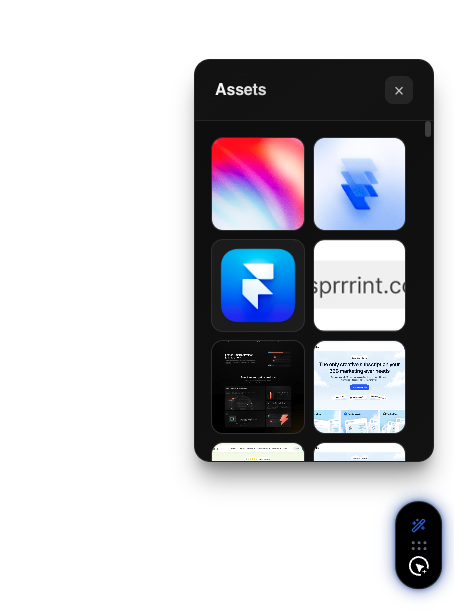
Pulls the images the page actually paints — including background images and masked SVG icons that are buried in CSS and hard to get at through DevTools. Preview, then download individually or as a set.
Colours
- Page
- Every colour used on the page, weighted by how much area it covers, with role guesses (primary, background, surface…).
- Selection
- Pick one element and scan just its subtree.
- Eyedropper
- The header button grabs a single pixel's colour.
Copy any swatch as HEX / RGB / HSL / a Tailwind class, see the nearest Tailwind
token, or export the whole palette as CSS variables or a tailwind.config block.
Fonts
The site's typography as a set of tokens.
- Scale
- Every distinct text style — labelled Heading 1, Body, Caption, Code… — each rendered in its real family, weight and size. The family row filters the list.
- Element
- Point at any text to see its font, size, weight, colour, line-height and classes, then click to open it.
Open a token for a live specimen plus copy-ready CSS and Tailwind.
Tip
You can also right-click any text on a page and choose Font Inspector for the same hover tooltip without opening the toolbar.
Clipboard
A running list of your recent captures. Each entry keeps the selector, a preview, and the code — copy it again, or open it in the web app. The panel pops open automatically right after you capture something.
Bookmarks
Save the current page to come back to later, and browse everything you've saved — favicon, host, age, favourite and remove. A saved page can be turned into a project in one click (see Bookmarks & page capture). Bookmarks are a Pro feature.
Settings
Theme (light / dark / system), your profile, and Workflow — your preferred export framework, which the Extract tool and AI Assistant both respect.
Keyboard shortcuts
| Shortcut | Action |
|---|---|
Alt + C | Toggle Extract mode |
Alt + P | Colour eyedropper |
Alt + A | Asset extraction |
Esc | Exit any tool |